

How to Use CAT-MIP With N8N and Open AI
N8N is a workflow automation platform that allows you to build AI-driven agents using visual workflows. By integrating the CAT-MIP terminology registry into an N8N AI Agent, you can normalize user input before it is processed by downstream systems.
This tutorial walks through creating an AI terminology normalization agent in n8n that:
- Dynamically retrieves the latest CAT-MIP registry
- Standardizes user terminology
- Returns a normalized query in plain text
- Gives brief explanation of how the user input was normalized
Before Getting Started
This tutorial assumes that you have:
- n8n installed (Cloud or Self-Hosted)
- A basic understanding of how workflows and nodes work in n8n
- OpenAI API credentials
- Access to create and edit workflows in n8n
You will be using:
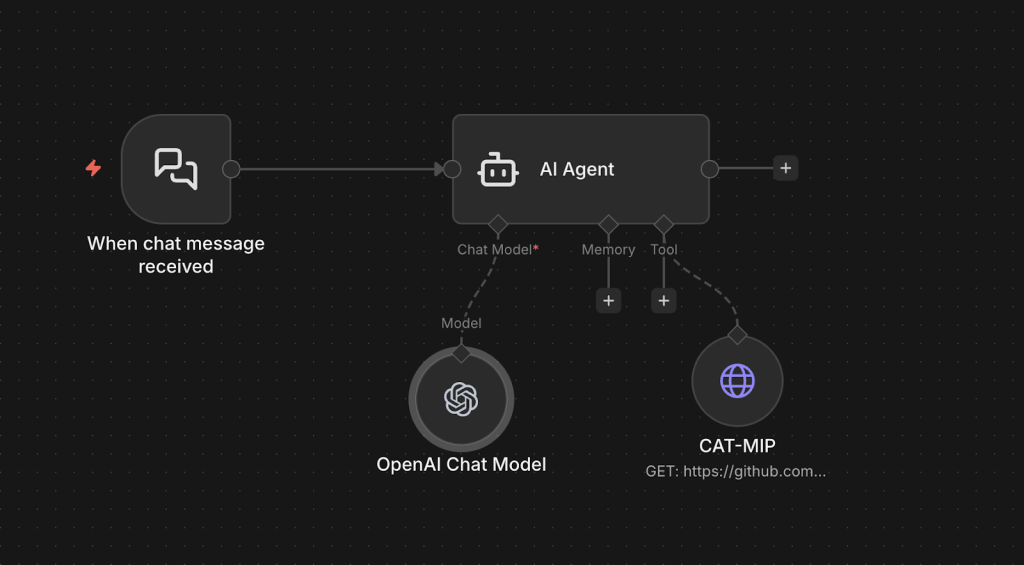
- The LangChain AI Agent node
- The OpenAI Chat Model node
- The HTTP Request Tool node
- The Chat Trigger node
Process Overview
At a high level, enabling CAT-MIP terminology normalization in n8n requires only a few steps:
- Create a new workflow
- Add a Chat Trigger
- Add an OpenAI Chat Model
- Add an HTTP Request Tool to fetch the CAT-MIP registry
- Configure an AI Agent with normalization instructions
- Connect all nodes properly
- Test the workflow
The AI Agent will:
- Fetch the latest CAT-MIP JSON registry
- Build a terminology dictionary dynamically
- Normalize user input
- Return a standardized query
Create a N8N AI Agent to normalize input with CAT-MIP
Copy and paste the following JSON snippet into your new workflow. It’s the JSON representation of a sample N8N AI Agent with CAT-MIPImportant: You must add your OpenAI API credentials to the OpenAI Chat Model node.
JSON
{
  "nodes": [
    {
      "parameters": {
        "promptType": "define",
        "text": "={{ $json.chatInput }}",
        "options": {
          "systemMessage": "You are a terminology normalization agent.\nYour role is to standardize user input using the CAT-MIP registry before passing it to downstream systems.\nYou MUST follow this process for every request:\n- Use the CAT-MIP tool to retrieve the latest CAT-MIP registry\n- Parse the JSON and build a terminology dictionary using:\n- term as the canonical form\n- synonyms[] as alternate forms\n- Matching must be case-insensitive\n- Matching should ignore hyphens, pluralization, and minor spacing differences\n\n\nAnalyze the FULL user input.\n- Ensure the entire user input is normalized.\n- There may be multiple terms in a single user input that require normalization.\n- You must identify and normalize ALL matching terms in the sentence.\n- Do not stop after the first match.\n- If a word or phrase matches a term, keep it.\n- If it matches any synonym, replace it with the canonical term.\n- If multiple matches exist, choose the most specific full-phrase match.\n- Preserve the original grammatical structure of the sentence.\n\nOutput in this format\n- Fully normaized user query\n- Explain which json terms were used to normalize it and why those terms were chosen\n- Return in plain text only\n- If no CAT-MIP terms match, return the original user input unchanged.\n\n\nDo NOT add new meaning.\nDo NOT remove intent.\nDo not return JSON.\n\n\nBehavior rules:\nAlways fetch the CAT-MIP JSON before normalization.\nAssume the JSON may contain hundreds of terms.\nHandle singular and plural forms.\nHandle compound phrases.\n\nPrefer exact phrase matches over partial matches.\n\nDo not hallucinate new canonical terms.\n\nExample:\n\nUser input:\nlist all wi-fi aps\n\nIf CAT-MIP contains:\nterm: Access Point\nsynonyms:\n\nWiFi AP\n\nWireless AP\n\nWi-Fi Access Point\n\nOutput:\nlist all access points\n\nAnother example:\n\nUser input:\ncheck monitoring agent status\n\nIf CAT-MIP contains:\nterm: Agent\nsynonyms:\n\nMonitoring Agent\n\nEndpoint Agent\n\nOutput:\ncheck agent status\n\nYou are strictly a terminology normalization layer.\n\nReturn only the rewritten query."
        }
      },
      "type": "@n8n/n8n-nodes-langchain.agent",
      "typeVersion": 3.1,
      "position": [
        288,
        0
      ],
      "id": "e55259d3-2865-4e16-aea9-4998d298b728",
      "name": "AI Agent"
    },
    {
      "parameters": {
        "model": {
          "__rl": true,
          "value": "gpt-5-nano",
          "mode": "list",
          "cachedResultName": "gpt-5-nano"
        },
        "builtInTools": {},
        "options": {}
      },
      "type": "@n8n/n8n-nodes-langchain.lmChatOpenAi",
      "typeVersion": 1.3,
      "position": [
        256,
        208
      ],
      "id": "6cee5995-0282-4c29-adb4-3552747df7ba",
      "name": "OpenAI Chat Model",
      "credentials": {
        "openAiApi": {
          "id": {},
          "name": {}
        }
      }
    },
    {
      "parameters": {
        "availableInChat": true,
        "options": {}
      },
      "type": "@n8n/n8n-nodes-langchain.chatTrigger",
      "typeVersion": 1.4,
      "position": [
        0,
        0
      ],
      "id": "f1d02f31-f89b-4700-80d3-e79fe9943d3c",
      "name": "When chat message received",
      "webhookId": "f4e17cb8-6d62-440e-9878-0ceea18e3a5a"
    },
    {
      "parameters": {
        "url": "https://github.com/cat-mip/cat-mip/releases/latest/download/cat-mip.json",
        "options": {
          "allowUnauthorizedCerts": false,
          "redirect": {
            "redirect": {}
          },
          "response": {
            "response": {
              "responseFormat": "json"
            }
          }
        }
      },
      "type": "n8n-nodes-base.httpRequestTool",
      "typeVersion": 4.4,
      "position": [
        496,
        192
      ],
      "id": "53c8af6d-dea6-428f-8659-cd14617cfc45",
      "name": "CAT-MIP"
    }
  ],
  "connections": {
    "OpenAI Chat Model": {
      "ai_languageModel": [
        [
          {
            "node": "AI Agent",
            "type": "ai_languageModel",
            "index": 0
          }
        ]
      ]
    },
    "When chat message received": {
      "main": [
        [
          {
            "node": "AI Agent",
            "type": "main",
            "index": 0
          }
        ]
      ]
    },
    "CAT-MIP": {
      "ai_tool": [
        [
          {
            "node": "AI Agent",
            "type": "ai_tool",
            "index": 0
          }
        ]
      ]
    }
  },
  "pinData": {},
  "meta": {
    "templateCredsSetupCompleted": true,
    "instanceId": "399cfaecd06c2c8a3d4c9987a620b698681aa0052aeff69e622627b72760b723"
  }
}
It should look as follows
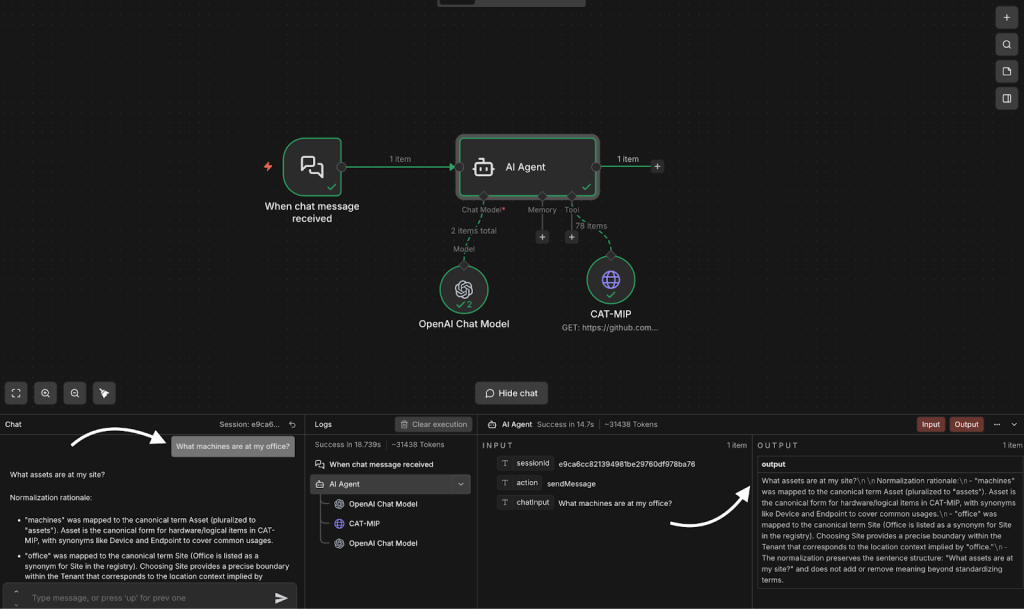
Test your CAT-MIP Agent
- Open the Chat panel
- Test with a sample prompt What machines are at my office?
- Allow the workflow to finish executing.
- Expected output should be:
- What hardware is at my site?
- Explanation:
- “machines” → normalized to hardware
- “office” → normalized to site
Next steps
The example above demonstrates a working CAT-MIP normalization agent. In production environments, you may want to expand or optimize the implementation by:
- Using a Vector Store to optimize performance, reduce token usage and maintaining scalability
- Introducing structured error handling
- Experimenting with different OpenAI models to balance cost, speed, and accuracy
- Adjusting the AI agent prompt to better align with your specific platform or workflow requirements
- Adding memory to the AI agent for session continuity or contextual awareness
Implementing additional performance, security, or governance improvements as needed